An SSL certificate should be provisioned and provided for a subdomain shortly after connecting, however it’s not immediate. If over 4 hours after connecting the subdomain you are still seeing a message stating "SSL activation for www.example.com is processing" or if you are seeing a "There was a problem issuing the SSL certificate for www.example.com" message, there are some common reasons which may cause this. Customers may see an in-app renewal failure alert (note this will only appear where SSL is being renewed and not where it is being provisioned for the first time) which should indicate that SSL renewal has failed and will provide detailed information about the issues affecting their SSL renewal.
However if customers are running into issues provisioning SSL for the first time or if they are unsure how to address their SSL renewal failures, there are a number of things you can confirm:
Tip:
What is the difference between a parent domain and a subdomain?
In short, the primary difference is that the parent domain represents the main website (e.g. example.com), while subdomains are separate sections or websites within the main domain (e.g. info.example.com).
If you have verified that all of the above reasons, the next step is to go ahead and file a Github Issueand be sure to include the following information:
- Specify what domain or subdomain the customer is looking to have an SSL certificate created for
- Provide a time estimate when the customer connected the domain or subdomain.
- If connecting a subdomain provide a link to the CNAME record for the domain in dig web interface https://digwebinterface.com/
- If connecting a parent domain provide a link to the A records for the domain in dig web interface https://digwebinterface.com/
- Provide a link to the CDN config endpoint in Hermes for the domain https://tools.hubteam.com/api/request/ae04ef1ba6e54cf3ab44c25823d87efe
Why is https://domain.com not redirecting to https://www.domain.com?
Most of the time this is because the root domain (non-www) isn't hosted within HubSpot, and this external server doesn't have an SSL certificate in place for it. We have a knowledge base article on this here.
How can I verify if a website is using Standard SSL?
-
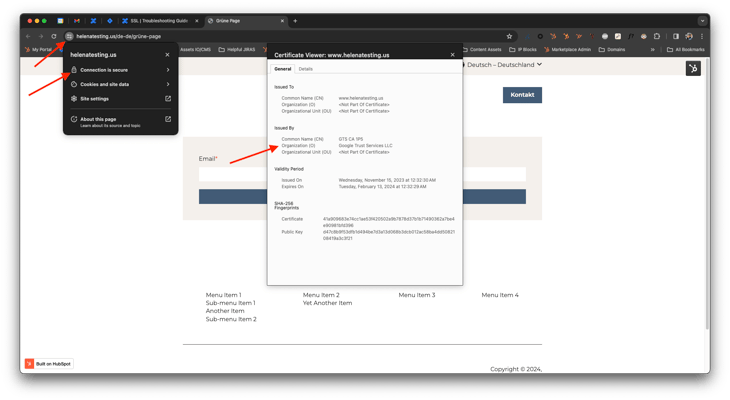
Using your web browser, navigate to the page, and click on the settings next to the URL bar
- Click on "connection is secure" or the similar phrasing
- When you see the SSL cert's details displayed, check the Organization: it should be Google Trust Services. The Common Name should be the customer's connected domain.
The most common explanation is that it is a mixed content warning (check the console). Mixed content occurs when the page is loaded over secure HTTPS connection, but other resources (e.g. images, videos, stylesheets) are loaded over an insecure HTTP connection. The solution would be to update, replace or remove the HTTP resources being referenced. There is nothing wrong with the SSL status of this subdomain.
See here:
1. How do I resolve mixed content warnings on an SSL site?
2. https://developers.google.com/web/updates/2015/12/security-panel
What does “//www.domain.com/styles.css” mean? Why is there no HTTP or HTTPS protocol specified?
This a protocol relative URL (aka protocol agnostic URL). That means the asset will load over the protocol the HTML document was loaded over. So if the page is loaded over HTTPS, the browser will request the resource using HTTPS.
What is HSTS and do we support that?
The HTTP Strict-Transport-Security response header (often abbreviated as HSTS) is a security response header that lets a web site tell browsers that it should only be accessed using HTTPS, instead of using HTTP. While similar to Require HTTPS, this security header instructs the browser to go directly to HTTPS. This prevents the first HTTP redirect from happening on subsequent visits and is more secure as a result.
We do support HSTS. You can click 'Edit' to the right of the domain within the domain manager, click on 'Update domain security settings' click on the 'Security Headers' tab, and then toggle on the header before saving.
A customer ran a SSL security test and says that HubSpot is supporting TLS 1.0, what does that mean?
TLS is the successor to SSL, similar to it TLS is a cryptographic protocol used for encryption (ooo fancy!). When you go to a page over https, chances are your computer is communicating with the server via some version of TLS instead of SSL, but cause that's extra work for people to know everyone still just says SSL. Much like how SSL functioned, TLS has several versions with newer versions being more secure. Some older computers/browsers don't support newer versions and can only make connections over older versions like TLS 1.0 as opposed to 1.1, 1.2 or 1.3. Since HubSpot wants to make sure that we allow as much traffic to your pages as possible, by default we will allow connections using any of these TLS versions.
You can update the minimum TLS version supported for a domain by navigating to Settings > Domains & URLs, clicking the Edit dropdown next to the domain, and clicking Update Domain Security Settings, then choosing the minimum TLS version to support.
A customer has an issue with Custom SSL
The Custom SSL add-on allows customers to purchase their own SSL certificate to use in HubSpot. This KB gives a good overview of the process. Problems with custom SSL tend to boil down to one of two issues:
- The customer did not create their SSL cert using the CSR file HubSpot provided, so the cert does not match the CSR. The only solution is for the customer to go back to the Certificate Authority (CA) who issued the cert and ask for a new one based on the CSR.
- The customer has a problem with their cert file. PEs can identify these issues on a CG Issue.
When troubleshooting a custom SSL case, the most important information to gather are: copies of the CSR file and cert file, screenshots of any in-app errors, and a HAR file that captures any error banner-messages in app.
How to check the sslStatus of a domain:
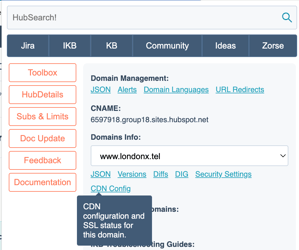
The sslStatus indicates the state of validation of the SSL certificate for a given domain. The sslStatus of a domain can be found using the CDN Config endpoint accessible via the Hermes extension on the Domains Settings page.
A successfully validated sslStatus is indicated by the number 4 - 'SSL_ACTIVE'. Below is a breakdown of the various sslStatus numbers and states that can be linked to domains if not successfully validated. Please include the sslStatus code number and state when filing an Issue.
sslStatus: 0 - ‘INITIALIZING’sslStatus: 1 - ‘PENDING_VALIDATION’sslStatus: 2 - ‘PENDING_ISSUANCE’sslStatus: 3 - ‘PENDING_DEPLOYMENT’sslStatus: 4 - ‘SSL_ACTIVE’sslStatus: 5 - ‘PENDING_DELETION’sslStatus: 6 - ‘DELETED’sslStatus: 7 - ‘CREATED
Useful Tools